Who’s responsible for your file
Your file is handled by Abid, Certified QuickBooks ProAdvisor — the same person through the review, the corrections and the hand-back.
About AbidQuickBooks by industry
Industry-specific QuickBooks help means building the file around how you earn, what you hold, and how money reaches you, not a generic template. Six intents cover every industry: trade and project-based work, transaction-heavy retail, work that answers to an outside rulebook, payment-processor reconciliation, recurring or multi-payer billing, and money that only passes through. Each gets a different setup on the same reconciliation-first method. We are an independent specialist firm, not Intuit.
Industry-specific QuickBooks help is the work of shaping the file — the chart of accounts, the tracking, and the way money is recorded — around the mechanics of how your business runs, rather than dropping you into a one-size template. The software is the same for everyone; what changes is the setup that makes its reports tell the truth about your business.
Those mechanics are what separate one industry from another in the books. A contractor earns by the job, so cost and revenue have to attach to the job. A restaurant rings hundreds of small tickets a day, so the sales side has to be summarized, not imported one line at a time. A law firm holds client money that must never mix with its own. An online store gets paid by a processor that keeps its fees before depositing the rest. Each of those is a different bookkeeping problem, and each needs QuickBooks configured differently to solve it. Getting the setup wrong is one of the most common reasons a file needs a cleanup later.
The router
We don't sort businesses by what they call themselves — we sort them by how money moves through them. Nearly every industry lands in one of six intents, and each intent needs a distinct QuickBooks setup. The map below shows the fan-out: one reconciliation-first method branching to the setup your mechanics require.
Industry → the QuickBooks setup it needs
A fan-out from a single method — reconcile first — to six industry intents and the QuickBooks setup each requires. Trade and project-based work (construction, trucking, real estate) needs job costing, work-in-progress, and class tracking. Transaction-heavy retail (restaurants, ecommerce) needs daily sales summaries and cost of goods sold. Work that answers to an outside rulebook (law firms, nonprofits, clinics, associations, breweries) needs structure and proof built to that rulebook. Payment processors (Shopify, Amazon, Stripe, Square, PayPal) need payout-to-deposit reconciliation. Recurring and multi-payer billing (gyms, SaaS, childcare) needs deferred revenue and payer splits. Pass-through money (agencies, salons, auto repair) needs earned income separated from what merely moved through. Every branch shares one method and ends in books that tie. Illustrative routing map, not a measured statistic.
The six lanes below are how we place your file. Most businesses sit cleanly in one; some run two streams at once, and we say how we handle that in the FAQs. What never changes is what sits underneath every lane — the same method we apply to every file, detailed on our methodology page.
If you earn by the job or the project, your books have to answer one question a generic setup can't: did this job make money? That means cost and revenue attached to the job, direct costs separated from overhead, and progress or work-in-progress handled so an unfinished job doesn't read as profit. Job costing, and often class or project tracking, is the setup this intent needs.
If you ring hundreds of small sales a day, importing every ticket buries the file. The fix is to summarize the sales side — daily or shift-level entries that split each revenue type, tax, tips, and discounts into the right accounts — and to track the cost side so cost of goods sold and inventory stay honest. Then everything reconciles to the point-of-sale system and the bank deposit.
Ecommerce almost always overlaps the processor lane below, because the money arrives through Shopify, Amazon, Stripe, Square, or PayPal — net of their fees. The ecommerce page connects the two.
If a regulator, a professional body, a funder or your own governing documents decide what your records have to show, correct structure comes before convenience. These files are judged on provability rather than tidiness: money that isn't yours kept separate and proved to the party it belongs to, a chart of accounts followed to a published definition, quantities and movements evidenced to the authority that will ask. We build and reconcile the bookkeeping; the rules themselves stay with the body that owns them and with your CPA or counsel.
If a processor pays you, it almost never deposits what your customer paid. It nets out fees, refunds, chargebacks, and reserves, then sends a lump sum days later. Book that lump sum as plain income and the fees disappear, the timing drifts, and your books never tie to the processor's own reports. This lane's setup maps each payout to its gross sales, fees, and refunds so the QuickBooks balance matches the processor statement — the reconciliation that makes retail and ecommerce files honest.
If customers pay before you deliver, or one charge is owed by two different parties, the cash arrives on a schedule that has nothing to do with when the money is earned or who owes it. Booked as plain income on the day it lands, the file reports a good month whenever billing runs and a bad one whenever it doesn't. This lane's setup holds unearned cash as a liability and releases it as the service is delivered, and splits a single charge across payers so each balance is tracked to whoever actually owes it.
If a large share of what moves through your bank account was never yours to earn — a client's media budget, a specialist's invoice you bill on, a chair a stylist rents from you — the question the books have to answer is whose revenue it actually is. Answered inconsistently, the top line stops describing the business: it grows when a client's budget grows and shrinks when the mix changes, for reasons that have nothing to do with the work. This lane's setup separates what you earned from what merely passed through, and holds that treatment steady so the number means the same thing every period.
Same spine
The setup changes by industry; the method underneath does not. Whatever lane your file sits in, the work is reconciliation-first, fixed-scope, and documented — because the mechanics are the variable and the discipline is the constant.
| Varies by industry | Constant, every file | |
|---|---|---|
| Chart of accounts shape | — | |
| What tracking is turned on | — | |
| Reconcile before we trust a number | — | |
| Fixed scope, quoted after a free review | — | |
| One specialist owns the file | — | |
| Written change log you can audit | — | |
| Verdict | Tailored to your mechanics | The method never bends |
How an industry engagement runs
Four stages, left to right, the same for every industry: a free, view-only review of the file; routing to one of the four intents; a QuickBooks setup built only to the mechanics that intent requires; and a reconciled result handed back with a written change log — the verified end state, marked with a tick. An illustrative sequence, not a measured statistic.
That is the honest version of "industry expertise." We don't keep a template farm or claim a roster of hundreds of clients in your trade — every business is different, and we say so. What we do is apply one proven method to your industry's specific mechanics, and prove the result reconciles. The full discipline lives on our methodology page.
The difference is that we route by mechanics and refuse to fake specialization. Plenty of firms advertise a badge for every industry and a headline client count to match. We don't publish numbers we can't prove, and we won't sell you added complexity your file doesn't need.
One specialist reads your file, decides which of the six intents it belongs to, and builds only the setup those mechanics require — then reconciles it and hands back a written record you or your CPA can audit. Where an industry touches rules we don't own — a state bar's trust requirements, a funder's grant terms, a payroll or tax filing — we handle the bookkeeping and point you to the authority that owns the rest, rather than pretend the line isn't there. That honesty is the point: a firm that tells you when your industry needs less, not more, is one you can trust with the setup it does need.
Sometimes the honest answer is that your file doesn't need an industry setup at all. If you invoice for straightforward services, get paid into one bank account, and hold nobody else's money, a plain, well-kept chart of accounts serves you better than tracking you'll never read.
We'd rather talk you out of complexity than sell it. If your books already reconcile and read clearly, you don't need us to industry-fy them. If the real issue is an Intuit account, login, or billing problem, that's Intuit's, not a specialist's. And if what you need is a plain cleanup before any industry setup makes sense — because a tailored chart built on unreconciled data just organizes the mess — we'll tell you that too. The free review is where we draw those lines, plainly, before any money changes hands.
You don't have to take our word for it. Here is the evidence you can check — the deliverable you receive, the method behind every setup, and our response commitment.
Your file is handled by Abid, Certified QuickBooks ProAdvisor — the same person through the review, the corrections and the hand-back.
About Abid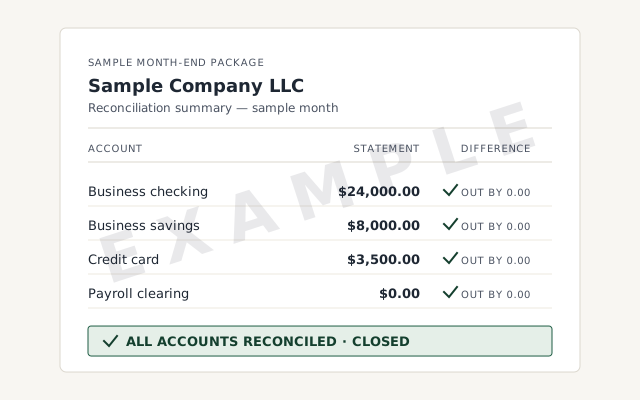 Sample workflow — not a specific client’s data
The workpaper and change log you receive when an engagement closes — the proof the industry setup reconciles, not just a claim that it does.
The one method behind every industry setup — read it before you hire anyone.
Read the full methodA written reply within one business day.
Remote-first, nationwide
Mon–Sat · 8am–6pm CT
We work entirely remote across all 50 states — secure view-only access for the free review, QuickBooks' accountant access to make and log every change once you hire us, a screen-share whenever you want to watch, and every change documented in writing, whatever your industry.
We tailor one method to your industry rather than claim to be a boutique for any single trade. Every business has its own mechanics — how it earns, what it holds, how money arrives — and those mechanics decide how QuickBooks should be set up. What we bring is a reconciliation-first method that we shape to those mechanics: job costing for a contractor, daily sales summaries for a restaurant, trust accounting for a law firm. If your industry is on this page, we have a clear route for it; if it isn't, a free review tells you honestly whether the same method fits your file.
It depends on what your business holds and how it gets paid. If you invoice for simple services and money lands in one bank account, general bookkeeping done well is plenty. You need an industry-specific setup when your work carries mechanics a generic chart of accounts can't capture — jobs to cost, inventory to value, client trust funds to segregate, restricted grants to track, or processor payouts that arrive net of fees. The free review is where we tell you which camp you're in, including when the honest answer is that a plain, clean setup serves you better than added complexity.
We set QuickBooks up so cost and revenue attach to the job, not just the month. That means items mapped to the right cost accounts, class or project tracking turned on where it earns its place, and a chart of accounts that separates direct job costs from overhead — so you can see margin per project instead of one blended number. For trades that bill progress, we also set up how deposits and work-in-progress post, so an unfinished job doesn't read as pure profit. The mechanics live on the construction and trucking pages; the discipline underneath is the same reconciliation-first method.
Yes — that reconciliation is a distinct lane of our work. A processor rarely deposits what a customer paid: it nets out fees, refunds, chargebacks, and holds, then pays a lump sum days later. If each payout is booked as plain income, the fees vanish and the books never tie to the processor's own reports. We set up the deposit-to-payout mapping so gross sales, fees, and refunds each land in the right account and the QuickBooks balance matches the processor statement. Each processor has its own page with the specifics.
We set up and reconcile client trust ledgers in QuickBooks so trust funds stay segregated from operating funds and each client's balance is provable. That means a separate trust bank account, a per-client ledger that never goes negative, and a three-way reconciliation between the bank, the book balance, and the sum of client ledgers. We handle the bookkeeping mechanics; we are not your compliance authority or your bar association, and we say so — the rules your jurisdiction imposes are yours to confirm with counsel.
Yes. Nonprofits track money by restriction, not just by category, so we set QuickBooks up to separate unrestricted, temporarily restricted, and permanently restricted funds — usually through classes or locations mapped to each fund or grant. Done right, you can show a funder exactly how their money was used and produce statements your auditor and Form 990 preparer can follow. The nonprofit page covers how we structure it; the reconciliation discipline is identical to every other file we touch.
High-volume businesses need the sales side summarized correctly and the cost side tracked, or the file drowns in transactions. Rather than import thousands of individual tickets, we book daily or shift-level sales summaries that split food, beverage, tax, tips, and comps into the right accounts, then reconcile them to the POS and the bank deposit. On the cost side we set up how inventory and cost of goods sold post. The restaurant and ecommerce pages go into the specifics of each.
Price follows the size and health of your file and the work it needs, not a per-industry sticker. Some industry mechanics — trust accounting, multi-entity real estate, heavy processor reconciliation — take more setup and so tend to scope larger, but we never quote from your industry label. We quote from your actual file after a free review, starting from $1,500, with a fixed fee for the scope. The pricing model is the same one we apply to every engagement.
Many do, and the setup follows the mechanics rather than the label. An ecommerce brand that also wholesales has both processor payouts and invoiced B2B receivables; a real-estate operator may run construction on the side. We map each stream to the setup it needs inside one coherent file — class or location tracking usually keeps them readable — instead of forcing your business into a single template. The free review is where we untangle which mechanics you're actually running and how to structure them together.
Not sure which lane you're in? Start with a free QuickBooks review, or read how every setup is built the same way on our methodology page. If the file needs fixing first, that's a cleanup.