Skip to content
QB Specialist

QuickBooks multi-currency cleanup

A multi-currency cleanup, where some of the damage cannot be undone.

A file running several currencies carries two versions of every foreign balance: the amount the counterparty agrees, and its home-currency value, which moves whenever rates do. When only the first is maintained, the balance sheet drifts while every statement still ties. The cleanup rebuilds the second one.

Last reviewed August 2026

  • Realized and unrealized separated
  • Permanent settings worked around
  • One firm — never a rotating pool

What a QuickBooks multi-currency cleanup is

A multi-currency cleanup is the work of rebuilding the home-currency side of a file that has been maintaining only the foreign side, and separating exchange movements into the accounts that let each one be read.

The distinguishing feature of this cleanup, and the reason it is unlike the others we do, is that some of what went wrong cannot be reversed. Intuit is explicit that once multicurrency is turned on in QuickBooks Online it cannot be turned off, because the conversion information has to keep being accounted for, and that the home currency is fixed at the same moment. A business that enabled the feature for one foreign supplier, or inherited a file where somebody else did, is living with that decision permanently. The cleanup is therefore partly a rebuild of what can be corrected and partly a set of deliberate workarounds for what cannot, delivered with a written statement of which is which. It is one lane of a full QuickBooks cleanup, and rarely the only thing a file of this age needs.

Realized and unrealized are two different events

A realized gain or loss occurs when a foreign transaction settles at a rate different from the one it was recorded at, and an unrealized gain or loss occurs when a balance that is still open is revalued at a newer rate.

Two numbers on one invoice

How a foreign invoice produces an unrealized movement while open and a realized one at settlement A foreign invoice is raised for 10,000 units of a foreign currency and booked at a home-currency value of 11,000. At the period end the balance is still open and is revalued at a newer rate to 11,400, so 400 is an unrealized gain sitting on an open balance. When the invoice is later settled the cash received converts to 11,250, so the movement of 250 against the original booking is realized and fixed. A confirmed panel notes that the foreign amount never changed at any point. Illustrative figures, no rates shown. ONE FOREIGN INVOICE Foreign amount, unchanged throughout 10,000 Home-currency value when booked 11,000 WHILE THE BALANCE IS STILL OPEN REVALUED AT PERIOD END Now worth 11,400 UNREALIZED — 400, ON PAPER WHEN IT ACTUALLY SETTLES Cash converts to 11,250 REALIZED — 250, FIXED The foreign amount never moved — only its home-currency value did ILLUSTRATIVE — NO RATES SHOWN
Illustrative: the same invoice produces an unrealized movement while open and a realized one when it settles. The foreign amount is constant.

Both are real and both belong in the books, in separate accounts. A file that records only realized movements shows nothing at period end and then a lump at settlement that nobody can explain. A file that pools the two into one exchange account can report a total but cannot answer the question that matters — how much of this is money that has actually moved and how much is a paper position that will change again next month. Which one arises is not a matter of preference: Intuit notes that a home currency adjustment affects receivables and payables as unrealized gains or losses, and bank accounts as realized foreign exchange gains or losses. The account being revalued decides the answer.

Why a foreign balance drifts without anyone noticing

Every foreign balance carries two numbers, and a business will normally only ever check one of them.

The number the business checks is the foreign amount, because that is the one the counterparty also holds. A supplier says the account owes ten thousand of their currency, the file says the same, and the balance is agreed. The number nobody checks is what that balance is worth in the home currency, which moves whenever rates move and is therefore wrong the moment it is set unless something maintains it. That is the whole reason the drift is so quiet: every reconciliation against every foreign counterparty can pass while the balance sheet quietly departs from reality. It surfaces later as a balance sheet that will not tie or an equity figure nobody can explain, which is why a multi-currency file is one of the specific things we check when a balance sheet is out of balance. Where the foreign side sits in receivables, the ageing has usually drifted too, which is an accounts receivable cleanup running alongside.

The constraints that cannot be cleaned up

Several multi-currency decisions are permanent once made, and an honest cleanup names them rather than implying they can be reversed.

Multicurrency cannot be switched off after it is enabled, and the home currency is fixed at that point. A customer or supplier who has recorded transactions cannot have the currency in their profile changed, and a single profile cannot hold more than one currency — so a counterparty you deal with in two currencies needs two profiles, which is workable but must be documented or it will be mistaken for a duplicate later and merged by somebody trying to help. Currency also has to agree across an entry: a payable belongs to an accounts payable account in the vendor's own currency, and QuickBooks will refuse an entry where the two disagree. That refusal is genuinely useful — it is one of the few places the software stops a mistake rather than recording it — but it surprises people mid-cleanup. And only one exchange rate can be saved per day per account, which is what unrealized movements are calculated from; a business trading at several rates in a day will see the difference appear as a realized amount at settlement instead.

How the cleanup runs: audit, rebuild, revalue

The work has three stages, and the first one decides whether the other two are worth doing.

The audit establishes what the file actually contains: which accounts, customers and vendors carry a foreign currency, whether the assignments are right, whether revaluation has ever been run, and whether exchange movements are landing anywhere sensible. It also finds the counterparties who exist twice, and the ones who should. The rebuild corrects what can be corrected — separating realized from unrealized into their own accounts, reclassifying movements that landed in the wrong place, and creating the profile workarounds that the permanent constraints require. The revaluation then brings foreign balances to a defensible home-currency value at each period end being restated, with the adjustments recorded so anybody can see what was changed and on what basis. Where a balance cannot be established from the records available, it goes on a list for you rather than being adjusted to whatever makes the total work. What we do not do is decide the tax treatment of the resulting gains and losses; that is your CPA's determination and it depends on your entity and where you operate.

How it runs

How a multi-currency cleanup runs

Every engagement opens with a free, view-only review. For a multi-currency file the review asks one question first: has anything ever maintained the home-currency side?

  1. Free review

    Day 0

    We read the file view-only, check whether revaluation has ever run, and see where exchange movements are currently landing.

  2. Audit the assignments

    Week 1

    Every foreign-currency account, customer and vendor checked against what it should be, with the permanent constraints identified and written down.

  3. Rebuild the accounts

    Weeks 1–2

    Realized and unrealized separated into their own accounts, misposted movements reclassified, and profile workarounds created and documented.

  4. Revalue and reconcile

    Weeks 2–4

    Foreign balances brought to a defensible home-currency value at each period end being restated, with anything unsupportable listed rather than plugged.

  5. Hand back or keep monthly

    Ongoing

    A written record of every adjustment and every permanent constraint — kept current each period if you want it kept, or handed back documented.

What changes

Clean multi-currency vs. a file nobody maintained

A maintained multi-currency file can be defended at both ends — the counterparty's number and yours. An unmaintained one agrees with everyone except the balance sheet.

Clean multi-currency vs. a file nobody maintained
Maintained Left alone
Realized and unrealized in separate accounts
Foreign balances revalued at period end
Home-currency value defensible
Currency assignments audited
Duplicate-currency profiles documented
Permanent constraints stated in writing
Foreign counterparty statements agree
Verdict Both numbers hold up Only the foreign one does

What it costs

What a multi-currency cleanup costs

Every cleanup is a fixed scope with a fixed fee, quoted after a free view-only review. The figures below are published starting floors; the review sets the real range for your file.

Multi-currency cleanup pricing
Engagement Typical range Timeline What's included
From $1,500 2–4 weeks Audit currency assignments, separate realized from unrealized, rebuild revaluation, document permanent constraints.
From $400/mo Ongoing Revaluation maintained each period, exchange movements posted correctly, month-end package.
Custom fixed quote Scoped first Several entities, several currencies, or a file also needing migration work.
Get your range after a free review

Multi-currency cleanup

Typical range
From $1,500
Timeline
2–4 weeks
Included
Audit currency assignments, separate realized from unrealized, rebuild revaluation, document permanent constraints.

Monthly bookkeeping

Typical range
From $400/mo
Timeline
Ongoing
Included
Revaluation maintained each period, exchange movements posted correctly, month-end package.

Multi-entity or many currencies

Typical range
Custom fixed quote
Timeline
Scoped first
Included
Several entities, several currencies, or a file also needing migration work.
Get your range after a free review

How QBSpecialist's multi-currency cleanup is different

One firm does the work — the same senior specialist start to finish — and you are told plainly which parts of the problem are fixable and which are permanent.

The method is verification rather than assertion: foreign balances are agreed to the counterparty in their own currency first, then revalued on a stated basis, so both numbers can be defended for different reasons. Where a historical rate or a settlement cannot be established from the records available, it goes on a list for you rather than being adjusted until the totals agree. We state no exchange rates and publish no formulas beyond what Intuit documents, because rates are yours and the treatment of the resulting gains and losses is your CPA's determination. And we will say when this cleanup is not worth buying — a handful of foreign transactions a year does not need it. Access stays minimal: view-only for the free review, QuickBooks' accountant access for the work, never your bank logins.

When NOT to hire us for a multi-currency cleanup

Skip this when foreign activity is occasional and settles quickly, or when what you actually need is a different cleanup underneath.

A business that buys from one overseas supplier a few times a year, pays promptly, and carries no open foreign balance across a period end has very little for revaluation to do — recording each transaction at the rate it settled at is enough, and paying for this work would buy you precision you will never read. If multicurrency was turned on by accident and you have never used it, the feature cannot be removed but it also is not hurting you, and the honest advice is to leave it alone rather than pay someone to tidy something inert. And if the real problem is that the file is behind, or damaged, or was migrated badly, currency is a symptom rather than the cause — a full cleanup or a look at the migration is the better first move. The free review will tell you which case you are in, including when the answer is that you do not need us.

What a multi-currency cleanup documents

You do not have to take our word for it. Here is the evidence you can check — the deliverable you receive, the reference behind the method, and our response commitment.

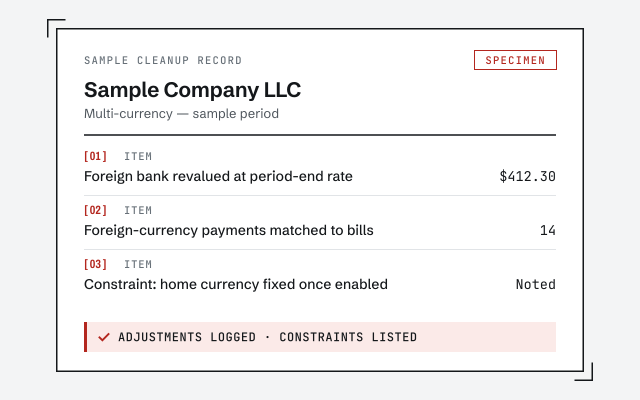
Sample month-end package — an illustrative reconciliation summary with every account out by zero for Sample Company LLC. Watermarked example, not a real client document. Sample workflow — not a specific client’s data

See a sample cleanup record

The adjustment log and constraint list a multi-currency cleanup hands back.

The method, in the open

Tying every account to its own evidence before trusting a number is the discipline underneath this — read how we do it.

Read the full cleanup method

Response commitment

A written reply within one business day.

Remote-first, nationwide

Mon–Sat · 8am–6pm CT

We work entirely remote — view-only access for the free review, QuickBooks' accountant access for the work itself, screen-share whenever you want to watch, and every revaluation and reclassification recorded in writing.

  • Texas
  • Florida
  • California
  • New York

Questions about QuickBooks multi-currency cleanup

Can multicurrency be turned off once it is on?

No. Intuit is explicit that once multicurrency is turned on in QuickBooks Online it cannot be turned off, because the currency conversion information has to keep being accounted for. Your home currency is also set at that moment and cannot be changed afterwards. That is why a multi-currency cleanup is partly a rebuild and partly a set of workarounds — some of what went wrong is permanent.

What is the difference between realized and unrealized gain or loss?

A realized gain or loss happens when a foreign transaction actually settles at a rate different from the one it was booked at — the money moved and the difference is fixed. An unrealized gain or loss is a paper movement on balances that are still open, recognized when those balances are revalued at a current rate. Both are legitimate; a file that records only one of them, or mixes them into a single account, cannot show either.

How does QuickBooks revalue foreign balances?

Through a home currency adjustment, which recalculates the home-currency value of a foreign balance at a newer rate and posts a journal entry for the difference. Intuit notes that the adjustment affects accounts receivable and accounts payable as unrealized gains or losses, and bank accounts as realized foreign exchange gains or losses — so which account is being revalued decides which kind of gain appears.

Why does our foreign vendor or customer balance look wrong?

Usually because revaluation has not been run, has been run inconsistently, or has been run twice. A foreign balance carries two numbers — the amount in its own currency, which is what the counterparty agrees, and the home-currency value, which moves every time rates do. When only the first is being maintained, the balance sheet drifts silently while the counterparty statement still agrees, which is why nobody notices for months.

Can we change the currency on a customer or vendor after the fact?

Not once transactions have been recorded against them. Intuit states that after a customer or supplier has recorded transactions you cannot change the currency in their profile, and one profile cannot hold more than one currency. The practical route is a second profile for the same real-world counterparty in the correct currency, which is workable but has to be done deliberately so the two are not later mistaken for duplicates.

Why does QuickBooks refuse some of our journal entries?

Because currency has to line up across the entry. A payable belongs to an accounts payable account in the vendor's own currency, and QuickBooks will reject an entry where the vendor's currency and the account's currency disagree. That constraint is a common surprise during a cleanup, and it is also useful — it is one of the few places the software actively stops a mistake instead of recording it.

How many exchange rates can a day carry?

One per account per day. Intuit states that only one exchange rate can be saved per day per account, and that this rate is what unrealized gains and losses are calculated from. Files that trade at several rates in a day cannot capture each of them in the revaluation, so the difference lands as a realized amount at settlement instead — which is correct, but worth understanding before someone tries to make the two agree.

Do you decide the tax treatment of our exchange gains and losses?

No. How foreign exchange gain and loss is treated on a return, and what documentation supports it, is a matter for your CPA and depends on your entity and where you operate. What we do is record the movements accurately and separately, so the person making that determination is working from figures they can rely on rather than reconstructing a year of currency movement.

Is a multi-currency cleanup worth it for a few foreign transactions?

Often not, and we will say so. A business with a handful of foreign purchases a year is usually better served by recording each at the rate it settled at and leaving revaluation alone. This cleanup earns its fee when foreign balances stay open across period ends, when several currencies are in play, or when the file has been running for a year or more without anyone maintaining the home-currency side.

What do we get at the end?

A file where realized and unrealized movements sit in their own accounts, foreign balances carry a defensible home-currency value, currency assignments have been audited and any duplicate-profile workarounds documented, and a written record of every adjustment made. Where something could not be corrected because the setting is permanent, you get that in writing too rather than discovering it later.