Who’s responsible for your file
Your file is handled by Abid, Certified QuickBooks ProAdvisor — the same person through the review, the corrections and the hand-back.
About AbidQuickBooks payroll support
"QuickBooks payroll support" means two different things. Intuit supports the payroll product itself — your subscription, the filings its service runs, software errors. An independent specialist supports your books: reconciling wage and tax liabilities in QuickBooks to the returns you actually filed. We are not Intuit; we do the second.
The phrase covers two completely different jobs that people run together: supporting the payroll product, and supporting the payroll records in your books. Knowing which one you need saves hours in the wrong queue.
Product support is Intuit's: it is help with the payroll subscription, the direct-deposit service, the tax filings Intuit's payroll runs on your behalf, and software errors inside the application. Books support is a bookkeeping job: making sure the wages, employer taxes, and liabilities recorded in QuickBooks actually agree with the returns that were filed and the deposits that were made. QBSpecialist does the second. We are an independent firm of QuickBooks specialists — not Intuit, and not affiliated with Intuit's payroll service — and we work inside your file to reconcile it, not to run your payroll. When the problem is genuinely the product or your account, the honest answer is that Intuit is who you need, and we will tell you so. If you are new to the product itself, our plain-English look at QuickBooks Payroll explains what the add-on does and where independent help fits.
Two jobs, one phrase
A two-column split of payroll support. The independent specialist works on the records in your books: liabilities tied to filed returns, wages, taxes, and fees separated, phantom balances cleared, every change documented in writing. Only Intuit can act on the payroll product: subscription and billing, the direct-deposit service, the filings Intuit's service submits, and errors inside the application. We reconcile — we don't run payroll or file returns. An illustrative split, not a measured statistic.
Go to Intuit when the problem is the payroll product or your account — a subscription or billing question, direct deposit that will not activate, a filing Intuit's payroll service submitted, or a software error inside the app. Those are Intuit's to resolve, and nobody else can.
Concrete cases that belong with Intuit: your payroll subscription lapsed or is billing wrong; you cannot log into your Intuit account; direct deposit was rejected or delayed; a tax payment Intuit's service was supposed to make did not go out; or the application throws an error when you try to run payroll — though some of those have a documented self-fix first, like error PS038, the Desktop payroll error caused by a stuck paycheck. For the rest, use Intuit's official channels — and get the current contact details from Intuit's own site rather than a number copied off a search result, because support lines change and a wrong one wastes your time. We will not print an Intuit payroll phone number here; the only number on this page reaches an independent specialist for help with your books.
If your payroll liabilities in QuickBooks do not match the returns you filed, no product-support queue can fix it — the software is working fine, the records are wrong. That is a bookkeeping problem, and it is the one we solve.
You are in this case when a "Payroll Liabilities" balance never clears even in months you deposited on time, when tax deposits are booked as plain expenses so the original liability stays open, when wages and employer taxes and provider fees are lumped into one account, or when your CPA cannot get the payroll totals in QuickBooks to agree with your W-2s and 941s. Calling Intuit about any of those leads nowhere, because the product is doing exactly what it was told — the entries just do not reflect reality. When it is a single stray entry you can move yourself, do; when the drift spans quarters or the balance sheet is carrying tax you already paid, that is a QuickBooks payroll cleanup, where we reconcile every liability back to what you filed and clear what is genuinely paid. And for the questions in between — a run recorded wrong, a liability you can't place — payroll help for your books is the lighter-touch version of the same specialist work.
Why liabilities drift
A process map of the payroll liability lifecycle. Payroll runs, wages and taxes are booked as a liability, and the tax deposit goes out. If the deposit is booked against the liability, the balance clears and the books match the filings. If it is booked as a plain expense, the liability never clears and a phantom balance grows — and the fix is bookkeeping: rebook deposits against what was actually filed and paid. The software isn't wrong, so no support queue can clear it. An illustrative worked example, not a measured statistic.
We reconcile payroll inside QuickBooks to what you actually filed and paid: comparing each wage and tax liability to the return that was filed and the deposit that was made, correcting payroll that landed in the wrong accounts, and documenting every change so you can trace it.
The discipline is verification, not assertion. We take the filed 941s, the state returns, and the deposits made, and we tie each liability balance to them period by period — the same reconciliation logic applied to payroll that a bookkeeper applies to a bank account. Where a deposit cleared nothing because it was booked to an expense, we move it to clear the liability. Where wages, employer taxes, and fees were blurred into one line, we separate them so the profit and loss reads correctly. Nothing is guessed: we work from the returns and your provider's own records, and you receive a written log of every entry we touched. That is the full methodology — how we prove your books tie to your filings rather than just claiming they do.
Which support?
The two do not overlap: Intuit supports the product and runs the filings; an independent specialist reconciles how payroll is recorded in your books. Here is where each one is the right call.
| Independent specialist | Intuit payroll support | |
|---|---|---|
| Fixes the payroll subscription, login, or software error | — | |
| Runs payroll and files payroll taxes | — | |
| Reconciles payroll in QuickBooks to your filed returns | — | |
| Corrects miscategorized wages, taxes, and fees | — | |
| Clears phantom liabilities off your balance sheet | — | |
| Best when | Your books don't match your filings | The product or your account is broken |
| Verdict | Fixes the records | Fixes the product |
Start a free QuickBooks review or call the number on this page, and you reach a specialist directly — not a ticket pool and not an offshore queue, one firm rather than a rotating pool. A written reply comes within one business day.
The free review is view-only: we look at your payroll liabilities and history, tell you whether what you have is a product problem for Intuit or a books problem for us, and scope the work honestly — including when the honest answer is that you do not need us. If you would rather talk it through first, book a call and we will walk your file with you. Access stays minimal throughout: view-only for the free review, QuickBooks' accountant access for the corrections, or a screen-share you control, never your banking or payroll logins. Everything we find is put in writing so you — and your CPA — have a record you can act on.
You don't have to take our word for it. Here is the evidence you can check — the method we use to prove your payroll ties to your returns, and our response commitment.
Your file is handled by Abid, Certified QuickBooks ProAdvisor — the same person through the review, the corrections and the hand-back.
About Abid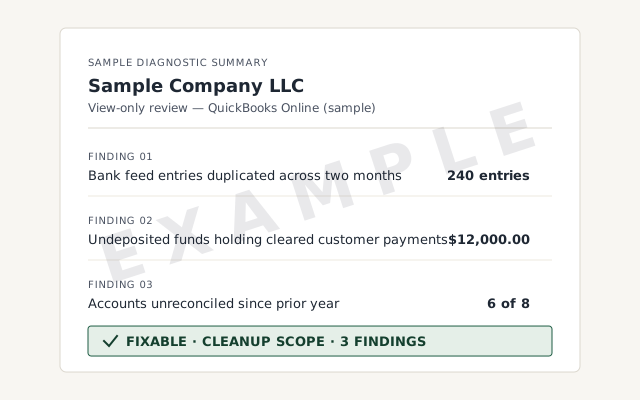 Sample workflow — not a specific client’s data
The liability reconciliation and change log you receive when the work closes.
How we tie payroll liabilities to filed returns. Read exactly how.
Read the full methodA written reply within one business day.
Remote-first, nationwide
Mon–Sat · 8am–6pm CT
We work entirely remote — view-only access for the free review, QuickBooks' accountant access for the work itself, screen-share whenever you want to watch, and every payroll correction documented in writing.
No. We are an independent firm of QuickBooks specialists — not Intuit, and not Intuit's payroll support. Intuit supports the payroll product itself: your subscription, the filings its service runs, and software errors. We support your books, reconciling payroll inside QuickBooks to the returns you actually filed. For product, account, or billing issues, use Intuit's official channels.
That is a bookkeeping problem, not a product problem, so Intuit's support will not resolve it — it is exactly what an independent specialist does. Liabilities drift when a deposit is booked against the wrong period or as a plain expense, so the balance never clears. We compare each balance to what you filed and paid, then correct the entries. When it is more than a stray entry, that is a payroll cleanup.
No, and we will never print one we cannot stand behind. If you need Intuit's product or account support, get the current contact details from Intuit's official site — support numbers change and we do not want to send you to a wrong or fabricated one. Our number reaches a real independent specialist for help with your books, not Intuit's payroll service.
No. We reconcile and correct payroll inside QuickBooks so your books are right; we do not run payroll, file payroll tax returns, or move money. Your payroll provider or Intuit's payroll service does the filing, and we make sure QuickBooks reflects what they actually processed and filed.
Start a free QuickBooks review or call the number on this page and you reach a specialist directly — no ticket pool, no offshore queue, one firm rather than a rotating pool. A written reply comes within one business day, so you have a record of what we found and what we recommend.
Still deciding what you need? Start at the QuickBooks support hub to route product questions to Intuit and books questions to us. If your payroll simply no longer ties to your filings, go straight to a payroll cleanup — or get a free QuickBooks review and we will tell you which it is.
Not sure how bad it is?
Describe the file and a specialist will tell you which of these you are dealing with — including when the answer is that you don't need us.